9to5Mac article
Free Mac app WhatCable tells you what each of your USB-C cables can really do
https://9to5mac.com/2026/07/13/free-mac-app-whatcable-tells-you-what-each-of-your-usb-c-cables-can-really-do/
Part of the content was translated and edited by GPT-5.6.
You could buy a hardware cable tester to check the performance and supported specifications of your cables, but now there's a free Mac app that does the same thing.
WhatCable measures how much performance a cable actually delivers while in use. Or you can test it by connecting both ends of the cable to different USB-C ports on your Mac.
GitHub link
https://github.com/darrylmorley/whatcable
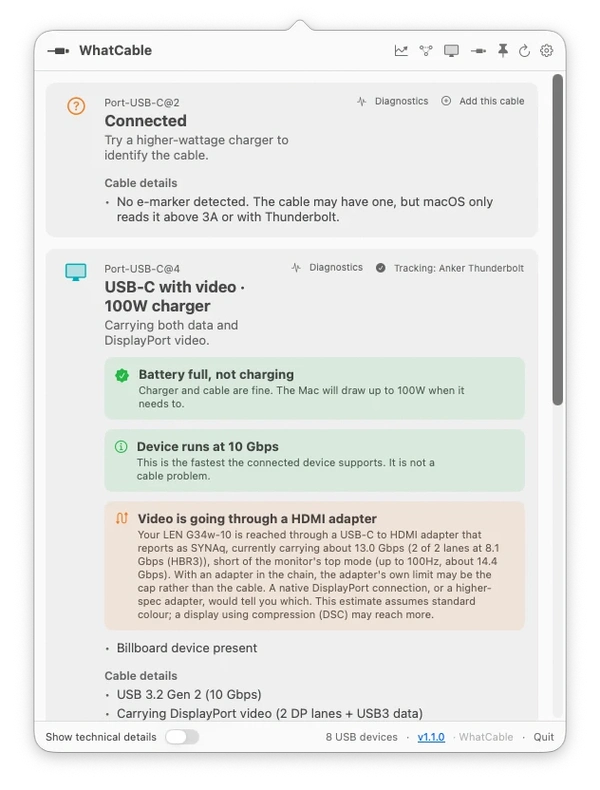
It can also read the identification information embedded in the cable's chip to identify the manufacturer and determine whether it is USB-IF certified. However, the lack of certification does not necessarily mean that it is a fake cable. It is possible that the manufacturer chose not to pay the certification fee.
This app is possible because Macs can already read performance information from the chips embedded in cables. WhatCable makes this data easily accessible and presents it in an easy-to-understand format.
The free app is available, but the pro version provides more detailed information by analyzing the real-time connection setup process to show why two devices are operating at a specific charging speed or transfer speed. The pro version is available for a one-time payment of £9.99.

