
Since this is a translation of an overseas article, there may be some mistranslations.
https://hothardware.com/news/lg-responds-to-gamer-outrage-monitor-bloatware
LG Issues Statement Regarding Automatic App Installation Program for Monitors
In July, it was revealed that LG monitors could actually install bloatware (specifically McAfee security software recommended by LG) on users' devices through Windows Update.
It was understandable why gamers were outraged and vowed never to consider an LG monitor again. LG has now officially responded to this backlash, promising to disable the included McAfee trial pop-up and avoid "third-party software recommendations" in the future.
Frankly speaking, shoving a McAfee trial into a display utility is completely unacceptable. When gamers spend hundreds or thousands of dollars on high-performance gaming monitors, the absolute last thing they expect is for Windows Update to sneakily bring in the LG Companion app and immediately start promoting a 30-day antivirus trial upon boot.
Bundling aggressive third-party adware with display hardware feels cheap and undermines consumer trust the moment they connect their monitor.
Fortunately, LG did not ignore this anger. After widespread community protests and direct intervention from Microsoft executives, LG issued a statement agreeing to explain the distribution process and disable the McAfee pop-up in the Monitor App Installer.
https://www.lg.com/za/support/announcement/lg-monitor-app-installer/lgsubscribe/
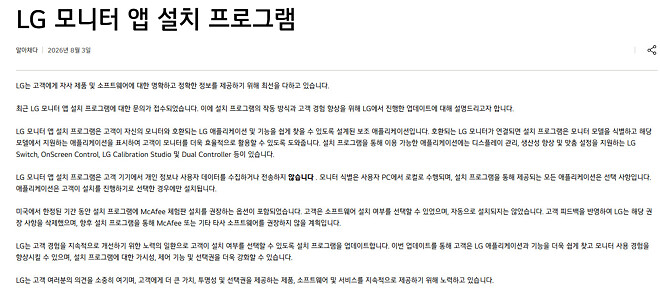
LG argued that McAfee itself was never installed without the user's explicit consent, which appears to be true. However, acknowledging the friction and agreeing to withdraw the advertising prompt is a welcome move. Swiftly retracting the anti-consumer action deserves a cautious nod of approval.
However, an official statement only has meaning when it's put into practice. Disabling one pop-up doesn't fundamentally address the broader issue of peripheral companion apps secretly self-installing through elevated Windows device metadata. This is a problem that lies with Microsoft, not LG.
From my Razer and Logitech peripherals to external hard drives and even Bluetooth soundbars, countless devices attempt to download additional applications as part of "essential driver software" through Windows Update. This is incredibly frustrating when trying to maintain a clean bench environment for testing.
Gamers will have to watch and see if future driver updates remain clean, or if LG simply swaps one advertising partner for another. While LG explicitly promised not to do so, it's impossible to know for sure. Until Microsoft makes significant changes to its guidelines for device manufacturers, keep a close eye on Task Manager every time you connect a new peripheral.
▶ Source: https://hothardware.com/news/lg-responds-to-gamer-outrage-monitor-bloatware

