Hello?
The other day, I shared an app that downloads securities reports from Kyobo Securities, Mirae Asset Securities, Hankyung, and Naver Securities. Today, the URL of Naver Securities has changed, causing an error.
So, I'm sharing the updated source code with the revised path as a responsibility for sharing the app.
There have been some minor revisions since the last version shared.
First, the date in [YYMMDD] format is added to the beginning of the downloaded report file name. It's better to explicitly state the date in the file name than to extract it from the file properties when looking at a specific stock or trend regardless of the folder.
Previously, the ID and password for accessing the Hankyung Consensus site were included in the source code. In this version, they are provided as environment variables from outside when running the app.
Finally, the default download location for this source is Downloads under the home folder. If you want to change this path, modify line 275 of the source.
The command to run in the Mac terminal is as follows:
export HANKYUNG_ID="ID"
export HANKYUNG_PASSWORD="Password"
python3 (file path/)Get_Report.py
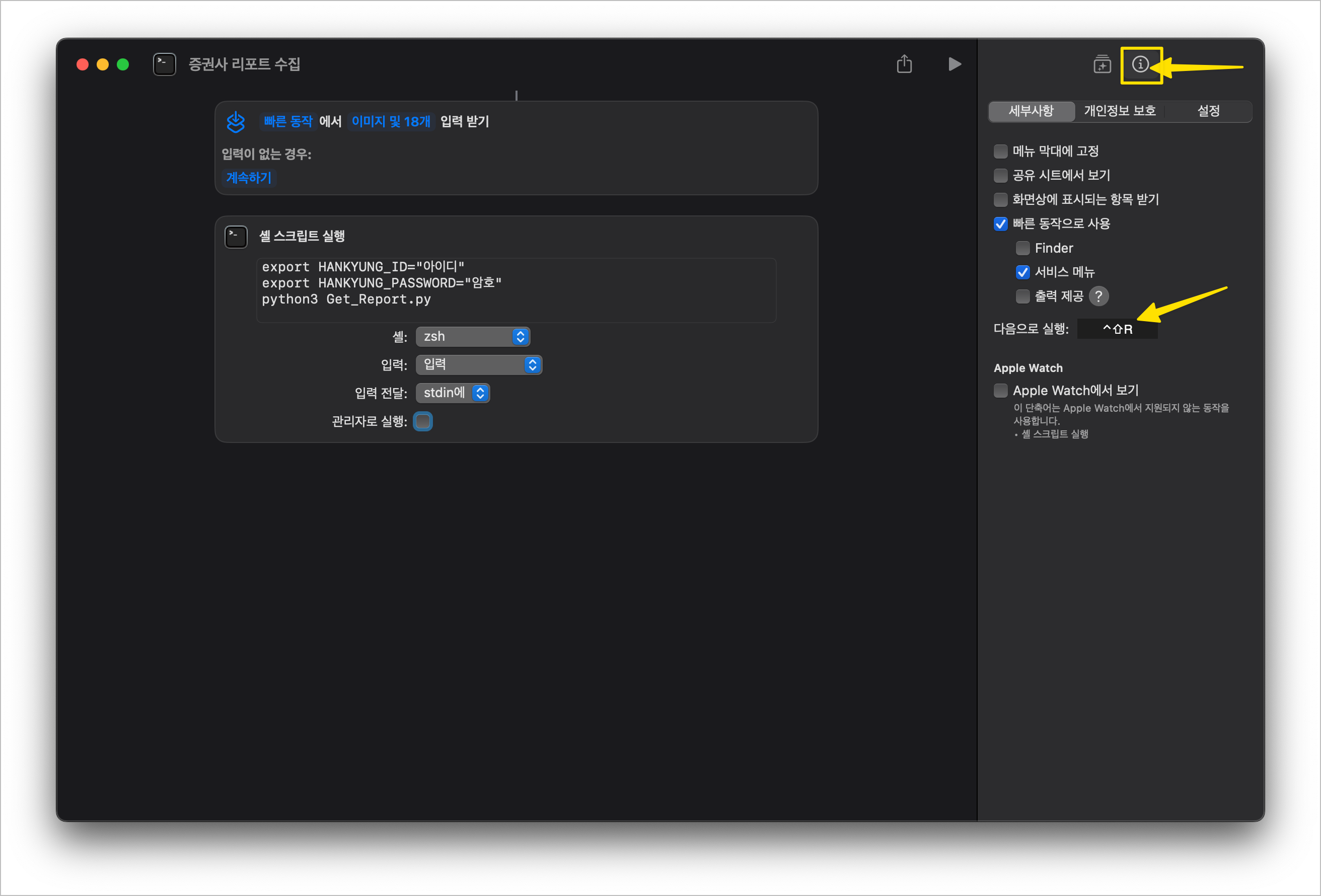
Tip: It might be inconvenient to run it in the terminal every time. You can register it as a shortcut on your Mac for easy execution with a shortcut key.
After creating a new shortcut, select 'Run Shell Script' and register the command as follows:
Click the information button indicated in the image and register the desired shortcut key in the 'Next Execution' box.