Windows Latest 기사
Microsoft admits a Windows 11 bug is eating up to 500GB of storage, verify if you are affected
https://www.windowslatest.com/2026/07/06/microsoft-admits-a-windows-11-bug-is-eating-up-to-500gb-of-storage-verify-if-you-are-affected/
소식 정리입니다.
윈도우 11을 쓰면서 남은 용량이 비정상적으로 부족해졌는데, 단순히 직접 저장한 파일 때문이 아닌 것 같다면 [설정 > 저장소 > 더 많은 범주 표시 > 시스템 사용 및 예약]에서 시스템 파일 사용량을 확인할 필요가 있다고 합니다.
사용량이 수백 GB라면 최근 'Capability Access Manager'와 관련된 파일이 시스템 드라이브를 계속 채우는 버그의 영향을 받고 있을 가능성이 있다고 합니다.
현재 이와 관련해 KB5095093 선택 설치 업데이트가 나온 상태입니다.
https://support.microsoft.com/ko-kr/topic/5095093
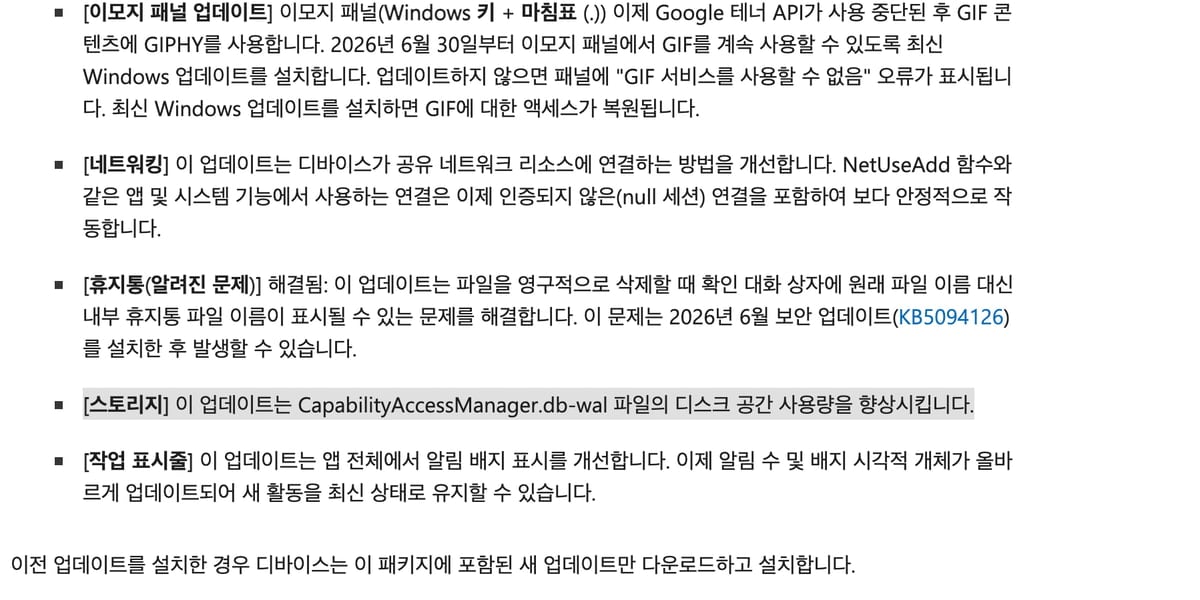
문제가 되는 파일은 C:\ProgramData\Microsoft\Windows\CapabilityAccessManager\ 경로에 있는데 이 폴더는 윈도우 시스템에서 보호하는 영역이라 파일 탐색기나 PowerShell에서 직접 열면 '액세스가 거부되었습니다'라는 메시지가 표시됩니다.
그러나 기사에서는 권한을 임의로 바꾸는 것은 권장하지 않으며, WizTree, TreeSize, WinDirStat 같은 서드파티 툴을 관리자 권한으로 실행해 용량이 비정상적으로 큰 파일을 확인할 수 있다고 합니다.
또는 관리자 권한이 있는 명령 프롬프트에서 아래 읽기 전용 robocopy 명령을 실행해도 된다고 합니다.
robocopy "C:\ProgramData\Microsoft\Windows\CapabilityAccessManager" "%TEMP%\CAMCheck" /L /B /R:0 /W:0 /BYTES /NP
참고로 모든 윈도우 PC가 이 버그의 영향을 받는 것은 아니라고 합니다. 만약 시스템 파일이 저장 공간을 거의 모두 차지하고 있다면 KB5095093 업데이트를 설치하는 것이 좋으며, 7월 정기 패치에도 반영될 것으로 예상됩니다.
관련 트위터(X) 글
https://x.com/WindowsLatest/status/2074275562538094826
Artikel Windows Latest
Microsoft Mengakui Bug Windows 11 yang Memakan Hingga 500GB Penyimpanan, Periksa Apakah Anda Terkena Dampaknya
https://www.windowslatest.com/2026/07/06/microsoft-admits-a-windows-11-bug-is-eating-up-to-500gb-of-storage-verify-if-you-are-affected/
Ini adalah ringkasan berita.
Jika Anda menggunakan Windows 11 dan ruang penyimpanan yang tersisa terasa kurang normal, bukan karena file yang Anda simpan secara langsung, Anda perlu memeriksa penggunaan file sistem di [Pengaturan > Penyimpanan > Tampilkan Lebih Banyak Kategori > Penggunaan Sistem dan Cadangan].
Jika penggunaannya mencapai ratusan GB, kemungkinan besar Anda terkena dampak bug yang menyebabkan file terkait 'Capability Access Manager' terus mengisi drive sistem.
Saat ini, ada pembaruan instalasi opsional KB5095093 yang tersedia.
https://support.microsoft.com/ko-kr/topic/5095093

File yang bermasalah terletak di jalur C:\ProgramData\Microsoft\Windows\CapabilityAccessManager\. Folder ini dilindungi oleh sistem Windows, jadi jika Anda mencoba membukanya melalui File Explorer atau PowerShell, akan muncul pesan 'Akses ditolak'.
Namun, artikel tersebut tidak merekomendasikan mengubah izin secara sewenang-wenang. Sebaliknya, disarankan untuk menggunakan alat pihak ketiga seperti WizTree, TreeSize, atau WinDirStat dengan hak administrator untuk memeriksa file yang memakan ruang penyimpanan secara berlebihan.
Alternatif lain adalah menjalankan perintah robocopy berikut di prompt perintah dengan hak administrator:
robocopy "C:\ProgramData\Microsoft\Windows\CapabilityAccessManager" "%TEMP%\CAMCheck" /L /B /R:0 /W:0 /BYTES /NP
Perlu diingat bahwa tidak semua PC Windows terkena dampak bug ini. Jika file sistem memakan hampir seluruh ruang penyimpanan, disarankan untuk menginstal pembaruan KB5095093. Pembaruan ini juga diharapkan akan disertakan dalam patch bulanan Juli.
Tweet Terkait
https://x.com/WindowsLatest/status/2074275562538094826
Windows Latest Article
Microsoft admits a Windows 11 bug is eating up to 500GB of storage, verify if you are affected
https://www.windowslatest.com/2026/07/06/microsoft-admits-a-windows-11-bug-is-eating-up-to-500gb-of-storage-verify-if-you-are-affected/
News summary.
If you're using Windows 11 and find that your remaining storage is abnormally low, and it doesn't seem to be due to directly saved files, you may need to check the system file usage in [Settings > Storage > Show more categories > System use and reserved].
If the usage is in the hundreds of GBs, it's possible that you're being affected by a bug where files related to 'Capability Access Manager' are continuously filling up the system drive.
Currently, there is an optional update KB5095093 available for this issue.
https://support.microsoft.com/ko-kr/topic/5095093

The problematic files are located in the C:\ProgramData\Microsoft\Windows\CapabilityAccessManager\ path. Since this folder is protected by the Windows system, you will receive an 'Access denied' message if you try to open it directly through File Explorer or PowerShell.
However, the article advises against arbitrarily changing permissions. It suggests using third-party tools like WizTree, TreeSize, or WinDirStat with administrator privileges to identify abnormally large files.
Alternatively, you can execute the following read-only robocopy command in an elevated command prompt:
robocopy "C:\ProgramData\Microsoft\Windows\CapabilityAccessManager" "%TEMP%\CAMCheck" /L /B /R:0 /W:0 /BYTES /NP
Note that not all Windows PCs are affected by this bug. If your system files are consuming almost all of your storage space, it's recommended to install the KB5095093 update. This fix is expected to be included in the July regular patch as well.
Related Twitter (X) post
https://x.com/WindowsLatest/status/2074275562538094826