Tahoe Upgrade 하고 나서 Synology NAS로 연결해서 백업하고 있는 TimeMachine이 제대로 작동을 안해서 해결책을 못 찾고 있었습니다.
한줄 요약하자면...
영문이 아닌 문자열에 대한 버그 인것 같습니다.
해결 방법은... 일단 기존 대로 TimeMacine BackUp을 NAS로 진행하면 작은 이미지만 생성되고 백업이 진행되지 않고 오류가 발생합니다.
- Disk Utility를 실행 -> 파일 -> "디스크 이미지 열기" : NAS에서 백업 실패한 작은 사이즈의 이미지 파일이 있습니다.
- 파인더에서 타임머신 이미지를 마운트 합니다. (타임머신 전용 계정이면 전용 계정으로 아이디, 암호 입력)
- 그리고 나면 디스크 이미지에 이름이 영문 + 한글 등으로 되어 있을건데 영문만 놔두고 이름을 변경합니다. (한글을 지웁니다.)
-
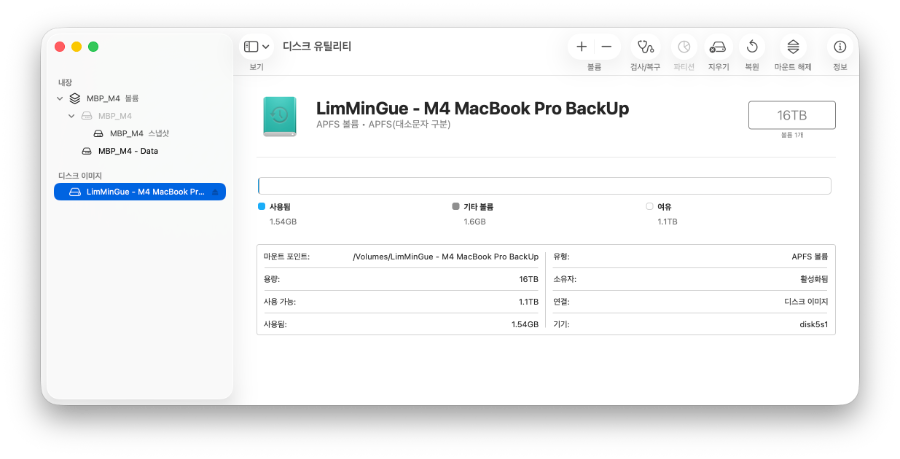
다시금 TimeMachine에서 백업을 시도해보시면 정상적으로 백업을 진행합니다.
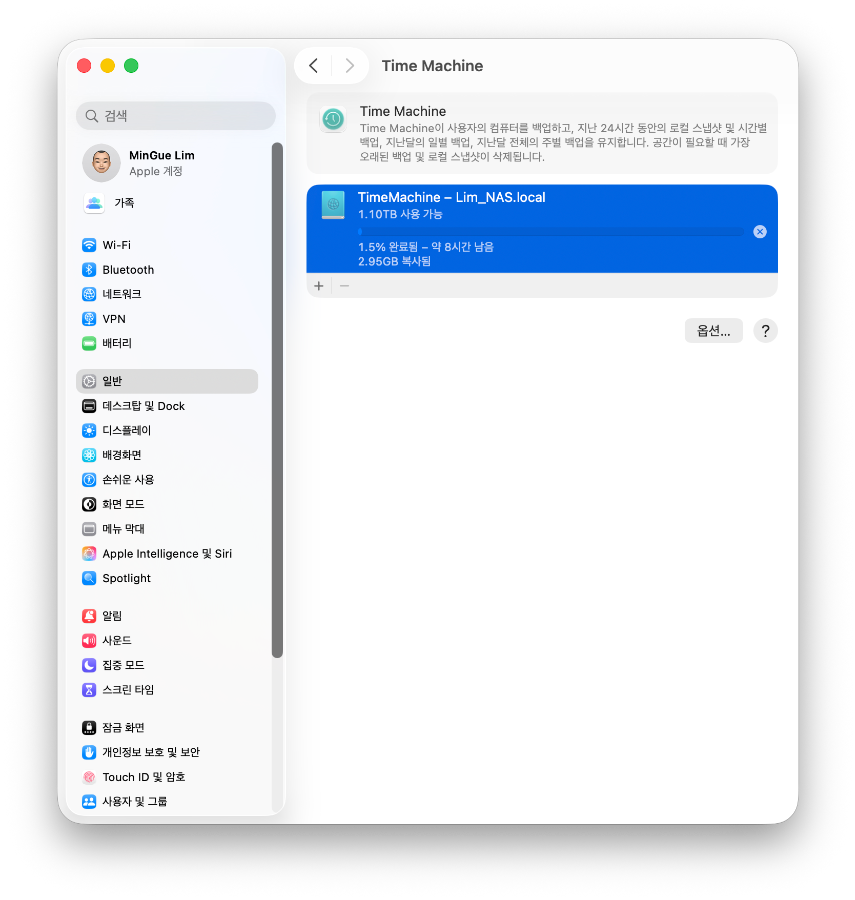
어쨌든... 애플에서 해결해줘야 할 문제이기는 하지만 당장 사용하는데는 문제가 없을 해결책입니다.
Setelah peningkatan Tahoe, saya tidak dapat membuat TimeMachine yang terhubung ke NAS Synology berfungsi dengan benar dan belum menemukan solusinya.
Singkatnya...
Sepertinya ada bug pada string non-Inggris.
Cara mengatasinya... Jika Anda melanjutkan pencadangan TimeMacine ke NAS seperti biasa, hanya gambar kecil yang akan dibuat dan pencadangan tidak akan berjalan serta terjadi kesalahan.
- Jalankan Disk Utility -> File -> "Buka Gambar Disk" : Ada file gambar berukuran kecil yang gagal dicadangkan dari NAS.
- Mount gambar TimeMachine di Finder. (Jika Anda memiliki akun khusus TimeMachine, masukkan ID dan kata sandi Anda.)
- Kemudian, nama gambar disk akan berupa bahasa Inggris + Hangul, dll. Ubah nama menjadi bahasa Inggris saja. (Hapus Hangul.)
-
Coba cadangkan TimeMachine lagi, dan pencadangan akan berjalan normal.
Bagaimanapun... Ini adalah masalah yang harus diselesaikan oleh Apple, tetapi ini adalah solusi yang dapat digunakan saat ini.
After upgrading to Tahoe, I couldn't get TimeMachine to back up properly to my Synology NAS. I couldn't find a solution.
To put it simply...
It seems to be a bug with non-English strings.
Here's how to fix it: If you try backing up TimeMachine to your NAS as usual, only a small image will be created and the backup won't proceed, resulting in an error.
- Launch Disk Utility -> File -> "Open Disk Image": There is a small size image file on your NAS where the backup failed.
- Mount the TimeMachine image from Finder. (If you have a TimeMachine-specific account, enter your ID and password.)
- Then, the disk image will likely have a name with English + Korean characters. Change the name to leave only English characters. (Delete the Korean characters.)
-
If you try backing up from TimeMachine again, it should work normally.
Anyway... This is a problem that Apple needs to fix, but for now, this solution works.

